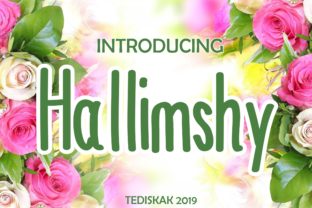
Hallimshy: A Whimsical Color Font for Creative Projects
Hallimshy is a color font built using the OpenType-SVG format. Unlike standard fonts that render in a single solid color, Hallimshy displays with built-in color, texture, and subtle visual nuance—giving each character a hand-crafted, playful appearance. Its design balances cuteness and whimsy without sacrificing legibility, making it suitable for projects where personality and visual charm matter.
Color fonts like Hallimshy are not new in concept, but their practical adoption has grown alongside improved software support. Hallimshy specifically leverages OpenType-SVG technology, which embeds vector-based color information directly into the font file. This allows glyphs to display multiple colors, gradients, or layered effects within a single character—something traditional OTF or TTF files cannot achieve.
Who Might Consider Hallimshy?
Designers working on branding elements, social media graphics, greeting cards, children’s book illustrations, or packaging may find Hallimshy useful when a lighthearted, approachable tone is needed. Its aesthetic appeals especially in contexts where warmth, friendliness, or gentle humor supports the message—such as boutique product labels, event invitations, or educational materials for younger audiences.
It’s also relevant for hobbyists using vector-cutting or digital illustration tools—provided those tools support OpenType-SVG. Users of Adobe Photoshop, Illustrator, Silhouette Studio (with SVG font support enabled), and Inkscape can access Hallimshy’s full color rendering. That compatibility matters because not all design applications handle color fonts consistently.
Key Benefits of Choosing Hallimshy
- Distinctive visual identity: Hallimshy stands out from generic script or handwritten fonts by offering consistent color treatment across characters—reducing the need for manual recoloring or layering effects.
- Efficiency in certain workflows: When designing for digital output or print-ready files where color fidelity is preserved, Hallimshy can streamline production—especially for short headlines or decorative text where expressive typography enhances impact.
- Cross-application consistency (within supported environments): Because the color data is embedded in the font, appearances remain stable across compatible programs—no need to manage separate swatches or effects per character.
Important Tradeoffs and Limitations
Hallimshy’s reliance on OpenType-SVG means it does not function identically—or at all—in every application. Notably, the OTF and TTF versions included with Hallimshy are fallback files intended for environments that don’t support color fonts. These fallbacks render in monochrome and lack the defining charm of the primary SVG version.
A critical limitation is Cricut Design Space compatibility. Hallimshy’s OTF and TTF files are explicitly incompatible with Cricut machines. While some users attempt workarounds—like converting text to outlines—the resulting shapes lose editability and scalability advantages native to font use. If your workflow centers on Cricut cutting, Hallimshy will not integrate smoothly without significant manual adaptation.
Another consideration is rendering behavior across platforms. Web browsers have limited OpenType-SVG support; Hallimshy won’t display correctly in most HTML/CSS contexts unless converted to SVG graphics or web fonts via alternative methods (which forfeits typographic flexibility). Similarly, Microsoft Office apps and older versions of design software may fall back to the monochrome OTF/TTF versions—or fail to load the font entirely.
When Hallimshy Is a Strong Fit
Hallimshy works well in scenarios where:
- You’re creating static digital assets—such as Instagram posts, PDF brochures, or presentation slides—in Photoshop, Illustrator, or Inkscape.
- Your project calls for a cohesive, cheerful typographic voice that avoids looking overly polished or corporate.
- You control the final output environment and can ensure the file stays within compatible software (e.g., delivering a layered PSD to a client who uses Photoshop).
- You prioritize expressive, ready-to-use type over maximum portability or long-term editability across tools.
In these cases, Hallimshy reduces the time spent building custom lettering or applying per-glyph color adjustments—offering a middle ground between fully custom illustration and generic font use.
When Alternatives May Be More Practical
If your work regularly involves:
- Cricut or other craft-cutting platforms: Look for fonts labeled “Cricut-compatible” or designed specifically for cut-file workflows. These typically ship as clean vector outlines or include compatible WOFF/WOFF2 web variants.
- Web-first delivery (e.g., landing pages, email newsletters): Standard web fonts (WOFF2) or inline SVG text offer broader browser support and better performance than OpenType-SVG.
- Long-form editorial or multi-user collaboration: Hallimshy’s specialized format may introduce inconsistencies when shared across teams using mixed software versions or operating systems.
- Branding systems requiring strict color control: Because Hallimshy’s colors are embedded, adjusting individual hues or ensuring precise CMYK/RGB alignment across media requires extra steps—unlike manually colored standard fonts.
Making an Informed Choice
Before selecting Hallimshy, ask yourself:
- Which software do I use most often—and does it support OpenType-SVG natively?
- Will the final output remain inside that ecosystem, or must it be transferred to others using different tools?
- Is the whimsical, colorful aesthetic essential to the project—or would a simpler script font with manual coloring achieve similar results with more flexibility?
- Do I need to scale text dynamically (e.g., responsive web layouts), or is this for fixed-size applications like posters or social banners?
Reviewing your typical file-handling practices helps clarify whether Hallimshy’s strengths outweigh its constraints. For example, if you frequently move files between Adobe apps and deliver final assets as PDFs or PNGs, Hallimshy integrates cleanly. But if your process includes frequent sharing with clients using non-Adobe tools—or relies on automated typesetting pipelines—it may introduce friction.
Also consider testing Hallimshy in your actual workflow before committing to larger projects. Try importing it into your preferred application, typing sample phrases, and exporting to your intended output format. Observe how colors hold up, whether kerning remains adjustable, and whether editing remains intuitive after export.
Hallimshy isn’t a universal replacement for standard fonts—but it fills a specific niche well. Its value lies in delivering authentic, low-effort charm where supported, not in broad interoperability. Understanding that boundary helps ensure it serves your goals rather than complicating them.