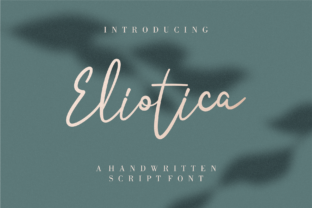
Eliotica: A Light-Handwritten Font That Fits Seamlessly Into Real Creative Workflows
Eliotica isn’t just another script font—it’s a deliberately light, fluid, and contemporary handwritten typeface designed to feel personal without sacrificing clarity or professionalism. Its subtle irregularities, soft contrast, and airy letterforms give it warmth and approachability, while its consistent rhythm and generous spacing ensure readability across formats. For creators who value both authenticity and polish—whether designing a brand identity, crafting an email newsletter, preparing a workshop handout, or publishing a digital course—Eliotica serves as a quiet but intentional tool for humanizing visual communication.
Where Eliotica Fits in the Design and Communication Process
Fonts aren’t chosen in isolation; they’re selected at specific inflection points in a workflow. Eliotica shines most when you’re moving from concept to execution—particularly during refinement, personalization, and final presentation stages. It rarely leads a project (like a bold display font might), nor does it serve as neutral body text (like a robust sans-serif). Instead, Eliotica functions best as a deliberate accent: a visual cue that signals care, intention, and individual voice.
Think of it as the equivalent of choosing a specific paper stock for printed materials or selecting a particular tone of voice in copywriting—it’s a detail that reinforces messaging without drawing attention to itself. Because it’s so light, Eliotica works especially well where subtlety matters: on minimalist websites, delicate packaging, invitation suites, educator slide decks, or branded Notion templates. It doesn’t dominate; it complements.
Using Eliotica Before, During, and After Key Project Milestones
Before launch or delivery: Use Eliotica early in mood board development or style guide drafting—not to lock in final typography, but to test emotional resonance. Pair it with your primary font (e.g., Inter or Lora) and ask: Does this combination reflect the tone we want to convey? Is the contrast balanced enough for hierarchy without visual tension? This step helps avoid last-minute font swaps that disrupt layout consistency.
During execution: Apply Eliotica selectively—not everywhere, but where emphasis meets intimacy. Examples include: handwritten-style callouts in Canva presentations, signature lines in PDF workbooks, short headings in Substack newsletters, or labels in Figma design systems. Because its light weight demands careful sizing and spacing, always preview at actual output dimensions (e.g., 16px on screen, 10pt in print) before finalizing.
After deployment: Revisit Eliotica usage during audits. Does it still align with evolving brand voice? Has increased usage diluted its impact? If you’ve started applying it to longer paragraphs or small UI elements, consider scaling back—it’s strongest when used sparingly and purposefully. Consistency here isn’t about repetition; it’s about maintaining contextual appropriateness.
Integration With Common Tools and Platforms
Eliotica is available in standard OpenType format (.otf), making it compatible with Adobe Creative Cloud apps (Photoshop, Illustrator, InDesign), Figma, Sketch, and modern web platforms via @font-face embedding. For web use, pair it with a system fallback (e.g., font-family: "Eliotica", cursive;) and always load it asynchronously to avoid layout shifts. Avoid using it for long-form body copy online—its lightness can strain readability at smaller sizes or on lower-resolution screens.
In productivity tools like Notion or Obsidian, Eliotica works well in custom CSS snippets for page titles or section headers—but only if your audience will view those pages in desktop browsers where font loading is reliable. For shared documents (Google Docs, Word), stick to native fonts unless exporting to PDF, where Eliotica embeds cleanly.
For print workflows, confirm with your printer that Eliotica’s thin strokes won’t risk ink spread or registration issues on textured stocks. A quick 300dpi proof run helps verify legibility—especially at sizes under 14pt.
Practical Implementation Tips for Consistent Results
- Respect its weight: Eliotica performs best at medium-to-large sizes (18pt+ for print, 24px+ for web headings). Avoid using it below 14pt in any context.
- Control contrast intentionally: Pair it with high-contrast backgrounds (deep navy, charcoal, crisp white) rather than mid-tones, which mute its delicacy.
- Leverage its natural rhythm: Use tracking (letter-spacing) sparingly—tightening slightly for headings, leaving default for short phrases. Never justify Eliotica text; left-aligned or centered works best.
- Test color carefully: Black (#000000) gives maximum clarity, but deep slate gray (#2D3748) adds warmth without sacrificing legibility. Avoid light grays or pastels unless backed by strong contrast.
- Limit scope per project: One or two strategic uses per deliverable—never more than three. Overuse erodes its distinctive charm and risks visual fatigue.
Workflow Examples Across Roles
Freelance designers often use Eliotica in client onboarding kits: not for full branding guidelines, but for personalized welcome notes or “next steps” checklists. It signals collaboration without formality—and feels handmade, not templated.
Educators and course creators apply Eliotica to reflection prompts inside digital workbooks (“What surprised you today?”) or to handwritten-style annotations in video transcripts. It gently cues learners to pause, engage, and connect personally with content.
Small business owners integrate Eliotica into seasonal email campaigns—specifically for subject lines or opening greetings—where warmth and familiarity boost open rates. Paired with clean sans-serif body copy, it creates a trustworthy yet personable impression.
Bloggers and content marketers use Eliotica for pull quotes in long-form posts, especially when highlighting first-person insights or reader testimonials. Its lightness avoids competing with main content while adding visual breathing room.
Factors That Support Long-Term, Effective Use
Preparation matters: Before licensing Eliotica, map out exactly where and how it will appear across touchpoints. A vague “we’ll use it for branding” invites inconsistency. Instead, define: “Eliotica appears only in handwritten-style subheadings on our website blog and in signature lines of downloadable resources.” Clarity prevents drift.
Compatibility extends beyond tech: Eliotica pairs well with human-centered design methods—like user testing or stakeholder interviews—because its tone supports empathy-driven communication. It’s less effective in highly technical or compliance-heavy contexts (e.g., legal disclaimers, API documentation), where neutrality and precision take priority.
Usability hinges on restraint: Unlike utility fonts built for scanning and speed, Eliotica asks for a moment of attention. That’s its strength—and its constraint. Reserve it for moments where slowing down enhances meaning.
Efficiency comes from smart defaults: Save Eliotica styles as presets in your design tools (e.g., “Eliotica Heading – 28px / 1.3 line-height”) and document usage rules in internal wikis or brand dashboards. This reduces decision fatigue and speeds up iteration.
Quality control starts with context: When reviewing assets, don’t just ask, “Does this look good?” Ask, “Does Eliotica serve a clear function here—and would removing it weaken the message or experience?” If the answer is no, it’s likely overused or misplaced.
Final Thought: Eliotica as a Deliberate Pause in Fast-Moving Work
In a landscape saturated with bold, algorithm-optimized, and instantly scalable design assets, Eliotica stands out by doing the opposite: it invites slowness, specificity, and tactile presence. It won’t automate your workflow—but it can deepen how people feel when interacting with your work. Used with intention—not as decoration, but as punctuation—it becomes part of a larger process of thoughtful execution. Whether you’re launching a product, teaching a concept, or sharing an idea, Eliotica offers a quiet way to say: This matters, and so do you.