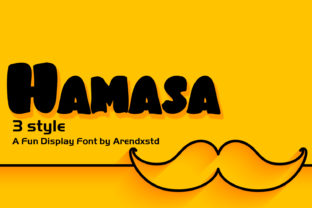
Hamasa: A Playful Handwritten Font That Fits Real Workflows
Hamasa isn’t just another decorative typeface. It’s a playful and bold handwritten font with an incredibly charming feel—designed not for shelf appeal, but for deliberate, context-aware use in real-world projects. Whether you’re sketching a pitch deck, designing workshop materials, launching a small business brand, or building a personal blog that reflects your voice, Hamasa adds warmth without sacrificing clarity. Its strength lies in how it integrates—not as a standalone flourish, but as a considered element within a broader creative or operational process.
Where Hamasa Fits in the Creative Process
Fonts aren’t chosen in isolation; they’re selected in response to intent, audience, and medium. Hamasa enters most naturally during the *refinement* phase—after structure is clear and tone is defined, but before final assets lock in. That’s when designers, educators, and entrepreneurs ask: “How do I make this feel human, approachable, and memorable?” Hamasa answers that question with confidence.
For example, a freelance educator building a course on emotional intelligence might draft slides in a neutral sans-serif for legibility, then switch to Hamasa for key takeaways, reflection prompts, or quote callouts. The shift signals a tonal pivot—not from formal to casual, but from informative to inviting. Similarly, a small bakery owner updating their Instagram carousel doesn’t swap all text to Hamasa. Instead, they apply it selectively: the tagline on a seasonal menu graphic, the handwritten “Thank You” on a customer appreciation post, or the title of a new baking tutorial video thumbnail.
Using Hamasa Before, During, and After Key Moments
Before a project starts: Hamasa helps clarify voice early. When brainstorming brand guidelines or planning a content series, testing headlines or value propositions in Hamasa reveals whether your messaging feels aligned with the personality you want to project. If “We simplify complex workflows” looks stiff or awkward in Hamasa, that’s useful feedback—not about the font, but about the phrasing.
During execution: Hamasa shines in layered workflows where hierarchy matters. In Figma or Adobe XD, it’s often paired with a clean, highly legible body font (like Inter or Roboto). Designers use it for primary headings, button labels with personality, or short hero text over photos—never for long paragraphs or data tables. This pairing supports scanning, improves retention, and maintains accessibility standards when used thoughtfully.
After launch: Hamasa contributes to consistency across touchpoints—not by being everywhere, but by appearing in predictable, meaningful places. A blogger might use it only for newsletter subject lines and episode titles in their podcast show notes. Over time, readers begin to associate that distinctive rhythm and energy with authenticity and intention—not randomness.
Compatibility and Practical Integration
Hamasa works best when treated as a *tool*, not a theme. It’s compatible with modern design platforms (Figma, Canva, Adobe Creative Cloud), web-safe via variable font files or Google Fonts integration, and export-friendly for print and digital use. But compatibility goes beyond technical support—it’s about alignment with your existing systems.
If your team uses shared design tokens or typography scales, Hamasa fits cleanly as a display weight. Define its role explicitly: “Hamasa = H1 and callout text only. Never smaller than 24px on screen, never larger than 72px in print.” This kind of guardrail prevents overuse and preserves impact. Likewise, if you rely on templates—whether Notion dashboards, Canva brand kits, or PowerPoint slide masters—adding Hamasa as a pre-approved option reduces decision fatigue and speeds up iteration.
It also pairs well with specific visual elements: soft watercolor textures, muted pastel palettes, line-drawn illustrations, and generous whitespace. Avoid pairing it with overly geometric icons, high-contrast gradients, or ultra-thin serifs—those combinations compete rather than complement.
Workflow Examples Across Roles
- Marketers: Use Hamasa in email header banners and CTA buttons—not in body copy. Test open rates when subject lines appear in Hamasa vs. system fonts. Often, the contrast boosts recognition in crowded inboxes.
- Educators: Embed Hamasa in editable PDF worksheets for student annotation zones or reflection boxes. Its friendly shape encourages engagement without triggering cognitive load.
- Freelancers: Include Hamasa in your proposal PDFs—but only for section headers and your signature block. It subtly reinforces your creative identity while keeping deliverables professional and scannable.
- Bloggers & creators: Apply Hamasa to featured quote graphics shared to Pinterest or X. Because it’s distinct yet legible at small sizes, it stands out in feeds without needing heavy filters or overlays.
What to Watch For: Usability and Long-Term Fit
Like any expressive font, Hamasa requires attention to context. Its charm can fade—or backfire—if applied without purpose. Ask yourself before each use: “Does this improve understanding, connection, or action? Or does it simply draw attention to itself?”
Legibility at small sizes remains its main constraint. On mobile screens under 18px, letterforms begin to blur. In multilingual projects, verify glyph coverage—Hamasa supports Latin-based languages well, but doesn’t include extended Cyrillic, Arabic, or East Asian character sets. If your audience is global, plan fallbacks or limit usage to English-only contexts.
Consistency matters more than frequency. Using Hamasa once per project—on a single, high-impact element—often delivers stronger recall than sprinkling it across ten low-stakes items. Think of it like a signature ingredient in a recipe: essential in the right proportion, overwhelming if overused.
Making Hamasa Part of Your Routine
Integration starts with intention—not installation. Add Hamasa to your font library, yes, but also add it to your mental checklist:
- Define its role: Where *exactly* will it appear—and where will it not?
- Test contrast: Does it pass WCAG AA contrast ratios against your background colors at intended sizes?
- Document usage: Note examples in your brand or style guide—even if informal—to avoid drift across collaborators or tools.
- Review quarterly: Open recent assets and ask, “Is Hamasa still serving its original purpose—or has it become habitual rather than strategic?”
This kind of discipline ensures Hamasa stays fresh, functional, and aligned with evolving goals. It’s not about using it more—it’s about using it better, with clearer cause and effect.
Ultimately, Hamasa earns its place not by standing out first, but by deepening connection second. It supports planning by clarifying voice, aids execution by reinforcing hierarchy, and strengthens outcomes by making messages feel intentionally human. When matched to the right moment, the right audience, and the right supporting elements, it doesn’t just turn a design into a standout—it turns intention into impact.