Moshinta: A Handwritten Font That Feels Human—Without the Hand
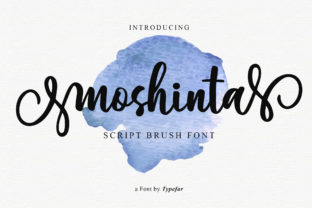
Design today isn’t just about clarity or contrast—it’s about connection. In a world saturated with algorithmically polished interfaces, AI-generated visuals, and templated layouts, audiences are quietly gravitating toward what feels intentional, personal, and quietly imperfect. That’s where Moshinta steps in: not as another decorative script, but as a smart handwritten font designed with thoughtful rhythm, natural variation, and a subtle, lovely twist that avoids cliché.
What Makes Moshinta Different From Other Handwritten Fonts?
Most handwritten typefaces fall into one of two camps: either overly rigid (with uniform spacing and predictable letterforms) or chaotically inconsistent (relying on randomness that can undermine readability and brand cohesion). Moshinta bridges that gap. It’s built with intelligent alternates—contextual ligatures, baseline shifts, and stroke-weight modulation—that respond to letter combinations, mimicking how a skilled hand would naturally adjust flow and pressure. The “lovely twist” isn’t gimmicky; it’s in the gentle asymmetry of the ‘a’, the soft lift at the end of the ‘t’, or the way lowercase ‘g’ leans just enough to feel alive—not staged.
This isn’t handwriting simulation for its own sake. It’s typography calibrated for authenticity without sacrificing utility. You can set body text, headlines, or even short UI labels in Moshinta and retain legibility at multiple sizes—something many expressive scripts struggle with.
Why Authenticity Matters More Than Ever—Especially in Digital Spaces
Consider how people interact with content now: scrolling faster, skimming deeper, trusting less. A 2023 Adobe Creative Cloud survey found that 68% of consumers say they’re more likely to engage with brands that communicate in a “human voice”—and that extends visually. Logos, email headers, social banners, even product packaging benefit from cues that signal care, craft, and individuality.
That’s why Moshinta resonates across disciplines. A freelance educator uses it for workshop handouts—not to look artsy, but to soften the tone of dense material. A small-batch skincare brand applies it to ingredient labels to reinforce handmade ethos without resorting to clichéd chalkboard aesthetics. A tech startup building a wellness app chooses Moshinta for onboarding screens because it signals approachability amid otherwise clean, functional interfaces.
It’s not about rejecting digital tools—it’s about using them to reintroduce warmth. And Moshinta does that without requiring illustration skills, calligraphy training, or custom lettering budgets.
How Moshinta Fits Into Evolving Creative Workflows
Creative professionals no longer juggle just one tool or one role. A marketer may design an Instagram carousel, write copy, and record a voiceover—all in a single afternoon. A teacher builds interactive lesson slides, then exports PDF worksheets for students. A solopreneur manages their website, newsletter, and merch store—often within integrated platforms like Figma, Canva, Webflow, or Shopify.
Moshinta is engineered for this reality. It supports OpenType features (like stylistic sets and discretionary ligatures) for advanced users, but also works seamlessly as a standard web font or desktop install. No plugins needed. No complex setup. Its file size stays lean, so embedding it on websites doesn’t slow performance—a practical detail that matters when SEO and Core Web Vitals affect visibility.
More importantly, it scales across touchpoints. Use it in a printed zine, then reuse the same font family for your Substack banner and Notion workspace header. Consistency becomes effortless—not because everything looks identical, but because the underlying voice remains coherent.
Real-World Use Cases—Beyond the Obvious
- Branded Email Signatures: Replace generic sans-serif names with Moshinta for a subtle, personable finish—especially effective for consultants, coaches, and service-based freelancers who rely on trust-building at first glance.
- Interactive PDFs: Educators and course creators use Moshinta for section headers and callout boxes in downloadable workbooks. The warmth encourages engagement without distracting from content structure.
- Product Packaging Labels: Small food producers, candle makers, and apothecaries apply Moshinta to batch numbers or origin notes—adding tactile nuance even on minimalist designs.
- Internal Team Documentation: Companies adopting remote-first culture use Moshinta for internal wikis or OKR dashboards to reduce visual fatigue and reinforce collaborative tone.
Not Just for “Creative” Projects—But for Clarity With Character
There’s a misconception that expressive fonts belong only in logos or social posts. But Moshinta proves otherwise. Its x-height is generous, its counters are open, and its letter spacing is optimized for screen reading. When used thoughtfully—paired with a neutral sans-serif for body copy, for example—it adds character without compromising function.
Think of it like choosing the right tone in writing: you wouldn’t use slang in a legal contract, nor would you draft a birthday card in formal legalese. Moshinta serves as that intentional tonal choice in visual language—appropriate for contexts where empathy, warmth, or craftsmanship matter, but never at the expense of comprehension.
Looking Ahead: What This Says About Design Priorities
The rise of fonts like Moshinta reflects a broader shift—not away from technology, but toward intentionality within it. We’re moving past “fastest,” “flashiest,” or “most scalable” as sole metrics of success. Instead, designers, developers, and business owners are asking: Does this feel like it was made for a person?
That question shapes decisions far beyond typography: in UX writing, in AI prompt engineering, in how analytics dashboards visualize data. Moshinta doesn’t solve those problems—but it’s a quiet, consistent reminder that human-centered design starts with small, deliberate choices. A well-chosen font won’t fix broken workflows or unclear messaging. But it can be the first cue that someone cared enough to get the details right.
Getting Started—Without Overcomplicating Things
You don’t need a branding overhaul to begin using Moshinta. Start small:
- Swap it in for one recurring element—like your blog post byline or podcast episode title graphic.
- Test it alongside your current primary font. Does it create contrast without conflict? Does it feel like a natural extension of your voice?
- Pay attention to hierarchy. Try Moshinta for subheadings while keeping body text in a highly legible sans-serif. Notice how it guides attention—and mood—without shouting.
And remember: authenticity isn’t performative. It’s cumulative. It lives in the consistency of your color palette, the clarity of your writing, the responsiveness of your site—and yes, in the quiet confidence of a handwritten font that doesn’t try too hard to look handwritten.
A Final Thought
Typography has always been invisible architecture—shaping how we absorb information before we even register the words. Moshinta doesn’t demand attention. It invites it. It offers familiarity without repetition, expressiveness without excess, and humanity without artifice. In an era where so much feels automated, outsourced, or optimized beyond recognition, choosing a font like Moshinta is a small, meaningful act of presence—one letter at a time.