Gooneybird: A Whimsical Sans Serif with Real Design Utility
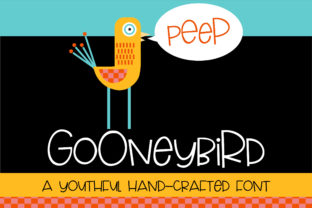
Gooneybird stands out not because it tries to be everything, but because it commits fully to a specific expressive role: a casual, friendly sans serif that carries personality without sacrificing legibility or structure. It’s not a display font designed for fleeting visual impact, nor is it a neutral workhorse built for dense text blocks. Instead, Gooneybird occupies a thoughtful middle ground—ideal for projects where tone matters as much as clarity.
What Makes Gooneybird Distinctive—Beyond the Quirk
At first glance, Gooneybird’s charm is unmistakable: rounded terminals, gently exaggerated curves, and subtle asymmetries in letterforms like the a, g, and y. But its strength lies in how those whimsical details are anchored by consistent spacing, balanced weight distribution, and a well-proportioned x-height. Unlike many playful fonts that sacrifice readability at smaller sizes or in longer passages, Gooneybird maintains coherence down to 14–16px in UI contexts and holds up well in short-form editorial layouts—think newsletter headers, social media banners, or product feature cards.
The family includes a single weight (regular) with true italics—not algorithmically slanted, but thoughtfully redrawn. That italic isn’t just decorative; it provides functional contrast for emphasis, pull quotes, or caption styling without disrupting rhythm. There’s no bold variant, which is a deliberate constraint—not a limitation. That absence encourages intentional hierarchy: use size, color, or layout instead of weight stacking, leading to cleaner, more considered compositions.
Where Gooneybird Delivers Practical Value
Gooneybird excels in scenarios where brand voice leans into approachability, warmth, or gentle irreverence—without veering into childishness or gimmickry. Consider these real-world applications:
- Small business branding: A local bakery, indie bookstore, or wellness studio might use Gooneybird for signage, packaging labels, or website headlines—pairing it with a neutral sans (like Inter or Open Sans) for body text to balance character with clarity.
- Digital product interfaces: In dashboard welcome messages, empty-state illustrations, or onboarding tips, Gooneybird adds human texture without undermining usability. Its open counters and generous spacing reduce cognitive load in low-stakes UI moments.
- Educational and creative content: Teachers designing handouts or workshop slides, or bloggers illustrating concepts with custom graphics, find Gooneybird effective for titles and callouts—it signals “this is friendly, but still serious about the idea.”
It performs especially well in color-rich environments. The font’s even stroke contrast and rounded geometry interact predictably with background gradients, soft shadows, or illustrated elements—no unexpected clipping or visual tension. That reliability matters when iterating quickly across mockups or responsive layouts.
Quality and Consistency: What You Can Depend On
Gooneybird is well-hinted and renders cleanly across modern browsers and operating systems—including stable performance on Windows with ClearType and macOS with Quartz. Glyph coverage includes Latin-1 and basic Latin Extended-A characters, supporting most Western European languages. Punctuation, numerals, and common symbols are carefully shaped to match the font’s voice: the ampersand has a looping, handwritten flair; the percent sign integrates smoothly with the numeral set; quotation marks feel organic, not tacked-on.
That attention extends to kerning pairs. While not exhaustively tuned for every possible combination, key problematic sequences (e.g., “To”, “Va”, “We”) are adjusted to avoid awkward gaps or collisions. For most practical uses—headlines under 10 words, short labels, button text—the default spacing works without manual intervention.
Who Benefits Most—and When to Pause
Freelancers and small teams often cite Gooneybird’s ease of integration as a key advantage. It’s lightweight (under 40KB WOFF2), requires no complex licensing tiers for commercial use, and drops cleanly into Figma, Adobe Creative Cloud, or web projects via standard @font-face declarations. There’s no learning curve—just apply it where tone needs lifting.
That said, Gooneybird isn’t universally appropriate. It’s less effective for:
- Long-form reading (e.g., blog posts over 500 words or documentation)
- High-trust contexts demanding gravitas (legal disclaimers, financial reports, official government communications)
- Situations requiring multilingual support beyond Western Europe (limited Cyrillic, Greek, or Asian script coverage)
- Brands with strict typographic systems built around high-contrast serifs or ultra-minimalist sans families
Also worth noting: because it’s a single-weight family, pairing becomes essential. Successful implementations almost always combine Gooneybird with a complementary typeface—one that provides structural counterbalance. A geometric sans (like Montserrat) offers clean contrast; a warm humanist option (like Lato or Nunito) deepens the friendly tone without redundancy.
Realistic Recommendations for Implementation
If you’re evaluating Gooneybird for an upcoming project, start small. Try it in three controlled contexts before scaling:
- Swap it into your current headline style—keep all other typography unchanged—and assess whether the shift in tone aligns with your message intent.
- Test it at two sizes (e.g., 28px for H2, 18px for subheads) against your primary body font. Look for visual harmony, not just contrast.
- Render it in your actual deployment environment: check how it appears on mobile Safari, Chrome for Android, and in email clients if used in campaigns. Subtle hinting differences can surface there.
For accessibility, ensure sufficient color contrast (at least 4.5:1 against backgrounds) and avoid relying solely on Gooneybird’s shape for meaning—its stylistic features shouldn’t obscure letter recognition for users with dyslexia or low vision. Pairing it with clear iconography or descriptive alt text mitigates this naturally.
A Font That Earns Its Place—Not Just Its Smile
Gooneybird doesn’t try to replace Helvetica or serve as a system font. Its value is narrower, more intentional—and that’s precisely why it endures. Designers return to it not because it’s trendy, but because it solves a recurring problem: how to signal warmth and humanity without resorting to cliché or compromising craft. It’s the kind of typeface that feels like a thoughtful choice rather than a default one.
In practice, Gooneybird works best when treated as a deliberate accent—not the foundation, but the spark. Used with restraint and paired with intention, it adds memorable character to digital and print work alike. For professionals who understand that typography shapes perception as much as content does, Gooneybird remains a quietly reliable tool: whimsical on the surface, rigorously functional underneath.